> For the complete documentation index, see [llms.txt](https://docs.synaps.app/llms.txt). Markdown versions of documentation pages are available by appending `.md` to page URLs; this page is available as [Markdown](https://docs.synaps.app/workspace-and-billing/cancel-or-keep-your-subscription.md).
# Cancel or keep your subscription
Stop your team's next renewal, check the end date, or keep the subscription before it ends.
You must be the **team owner**.
## Cancel the subscription
1. Select the team whose subscription you want to cancel.
2. Click the gear beside the team name and open **Subscription**.
3. Scroll to **Cancel plan** and click it.
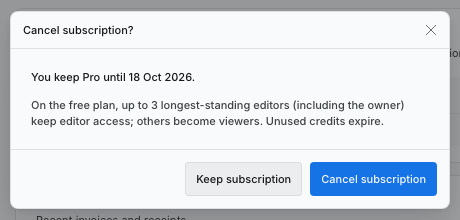
4. Read the end date and the changes to access and credits.
5. Click **Cancel subscription**.
Your paid plan stays active until the date shown in this confirmation.
## What happens next?
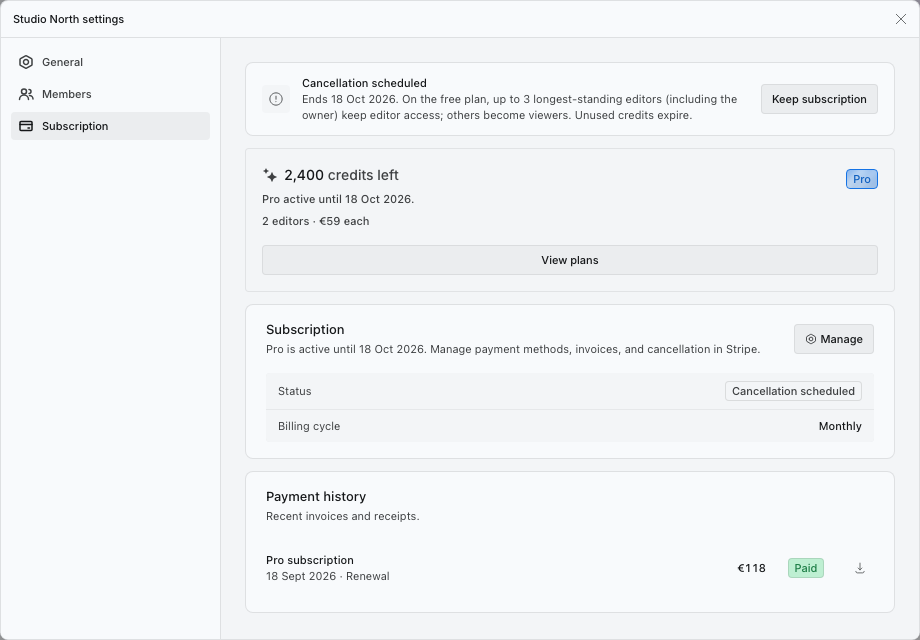
Subscription shows **Cancellation scheduled**. You keep the paid plan until its displayed end date.
When the team returns to Free:
* The owner and the longest-standing team editors keep up to three editor places in total. Additional team editors become viewers.
* Project guests with Editor access become viewers, unless they are owners.
* Remaining credits from that team's paid subscription expire.
Your account and projects are not deleted. Cancelling also removes any previously scheduled plan change.
Use Keep subscription before the end date if you change your mind.
## Keep the subscription
Before the end date, open **Team settings → Subscription** and click **Keep subscription** in the cancellation notice. Check that the cancellation notice disappears.
If the subscription has already ended, [choose a paid plan again](/workspace-and-billing/upgrade-your-subscription.md).
## Related guides
[Change your plan or billing cycle](/workspace-and-billing/change-your-plan-or-billing-cycle.md) · [Manage payment details and invoices](/workspace-and-billing/manage-payments-and-invoices.md).