> For the complete documentation index, see [llms.txt](https://docs.synaps.app/llms.txt). Markdown versions of documentation pages are available by appending `.md` to page URLs; this page is available as [Markdown](https://docs.synaps.app/collaborate/switch-create-and-rename-teams.md).
# Switch, create and rename teams
Choose a workspace, create a team or update its name.
## Switch teams
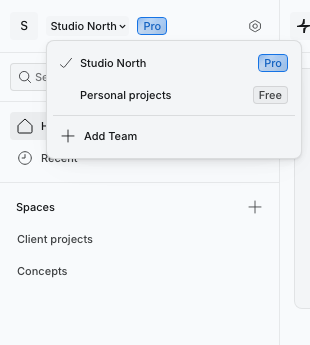
1. Click the current team name at the top left of the dashboard.
2. Select the team you want to open.
The checkmark identifies your current team.
The sidebar and projects update to the selected team. Switching teams does not move your projects or transfer a subscription.
## Create a team
Open the team switcher and click **Add Team**. Synaps opens the new team.
You can normally own one free team. If Synaps shows a team limit, upgrade an existing team before creating another.
## Rename a team
You must be the **team owner**.
1. Open the team you want to rename.
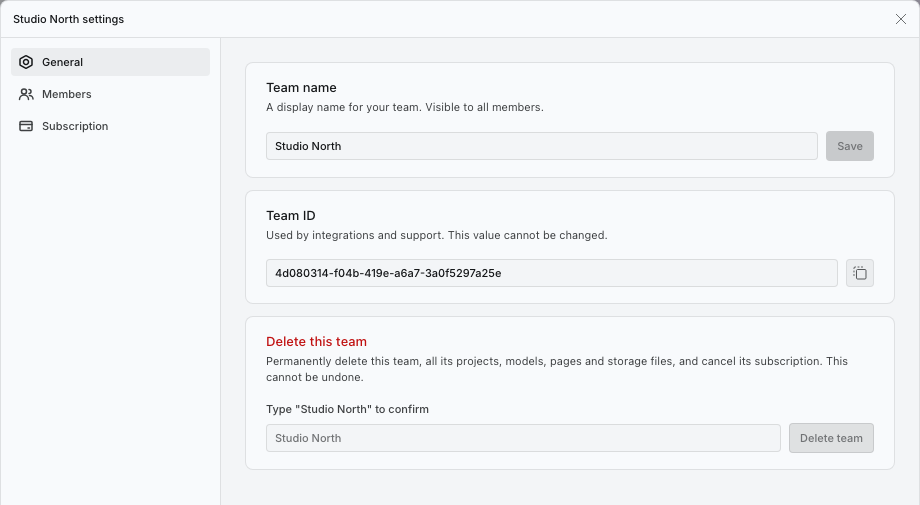
2. Click the gear beside its name to open **Team settings**.
3. In **General**, enter a **Team name**.
4. Click **Save**.
Use General to name the team or copy its ID for support.
The new name appears in the team switcher.
## Copy the team ID
In **Team settings → General**, click the copy button beside **Team ID**. Share this ID with support when asked; the ID itself cannot be edited.
## Related guides
[Invite and manage team members](/collaborate/invite-and-manage-team-members.md) · [Organise spaces and projects](/collaborate/organise-spaces-and-projects.md).